Agents
Designing Tool Use for LLM Agents: A PM's Guide
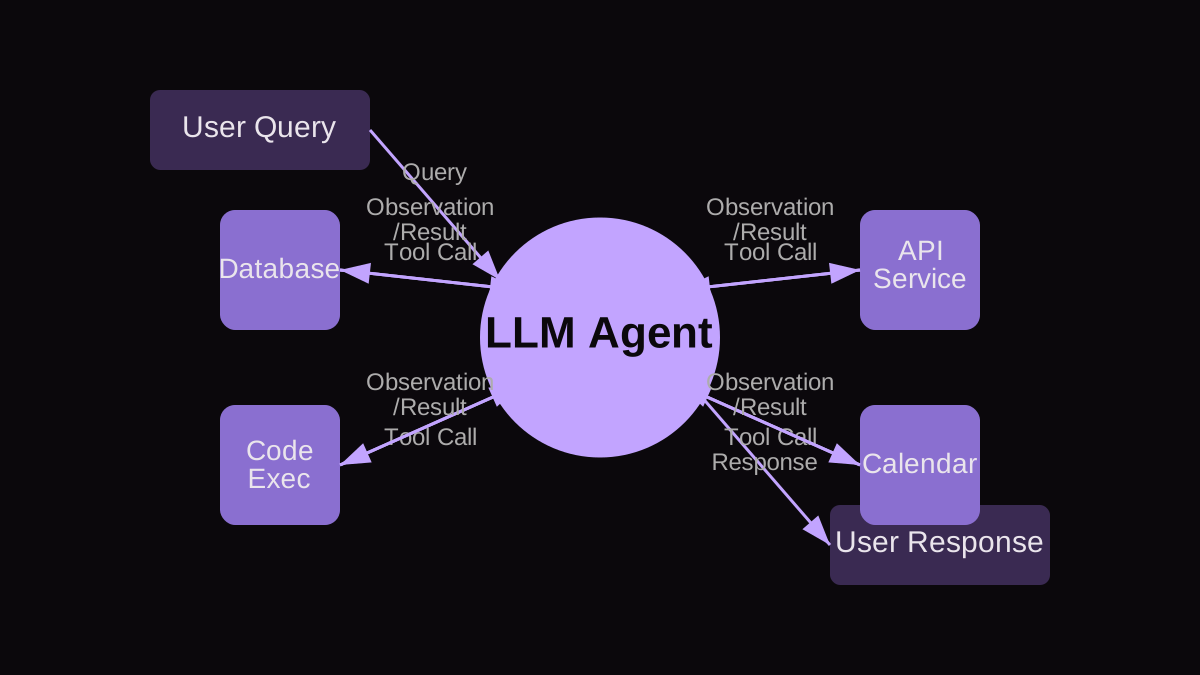
The ability for Large Language Model (LLM) agents to effectively use external tools is not just an enhancement; it's a fundamental requirement for them to transition from sophisticated chatbots to truly autonomous, value-generating entities. As AI Product Managers, our core responsibility is to define what capabilities these agents need, which inevitably means specifying how they interact with the world beyond their training data – by calling APIs, querying databases, or executing code. Without robust tool integration, an LLM agent remains confined to its linguistic sandbox, unable to perform real-world actions like booking a flight, analyzing live data, or interacting with legacy systems. Our role moves beyond prompt engineering; it's about designing a coherent, secure, and scalable ecosystem where the agent acts as an orchestrator of specialized functions.
This guide will walk you through the strategic considerations, design principles, and common pitfalls of enabling tool use for LLM agents, providing you with actionable insights to expand your agents' capabilities effectively.
Why is Tool Use Critical for LLM Agents?
Tool use addresses several inherent limitations of LLMs, transforming them from passive knowledge bases into active problem-solvers. First, it overcomes the LLM's knowledge cutoff. While LLMs are trained on vast datasets, that knowledge is static. Tools allow agents to access real-time information – current stock prices, weather updates, or a user's personal calendar. Second, tools enable precise, deterministic computation that LLMs often struggle with. LLMs are probabilistic by nature; they can't reliably perform complex arithmetic, execute specific database queries, or run precise code. By delegating these tasks to dedicated tools, agents gain accuracy and reliability. Third, tools provide access to the physical and digital world. An LLM cannot inherently send an email or book a meeting, but a tool can. This bridge to external systems is what empowers agents to perform meaningful actions, moving from 'talk' to 'do'.
From a product perspective, tool use means unlocking use cases that were previously impossible or required significant human intervention. Imagine a customer service agent that can not only answer FAQs but also look up order statuses, initiate refunds, or schedule a callback. This significantly elevates the agent's utility and the user experience. The 'why' is always about expanding the agent's sphere of influence and utility in a measurable, impactful way.
How Do You Strategically Identify and Prioritize Agent Tools?
Identifying the right tools isn't about connecting every available API; it's about strategic alignment with user needs and business goals. I use a framework I call the 'Agent Capability Matrix' (ACM) to guide this process. The ACM helps prioritize tools based on their impact on user value and technical feasibility.
- 1. Identify Core User Journeys: Map out the key tasks users need to accomplish. Where do current LLM capabilities fall short? Where do users switch to another tool or ask for human help?
- 2. Pinpoint Capability Gaps: For each journey, list specific actions the agent cannot currently perform (e.g., 'retrieve live data,' 'perform complex calculation,' 'initiate external action'). These gaps are prime candidates for tool integration.
- 3. Brainstorm Potential Tools: For each gap, identify existing APIs, internal services, or external platforms that could bridge it. Don't worry about integration complexity yet.
- 4. Assess Value Impact: For each potential tool, quantify its potential impact on user satisfaction, efficiency gains, or new revenue streams. Consider both direct and indirect benefits.
- 5. Evaluate Technical Feasibility and Cost: Analyze the effort involved in integrating the tool, its reliability, security implications, maintenance overhead, and any associated API costs. This includes data parsing, error handling, and latency considerations.
- 6. Prioritize with the ACM: Plot tools on a simple 2x2 matrix: 'High Value / High Feasibility', 'High Value / Low Feasibility', 'Low Value / High Feasibility', 'Low Value / Low Feasibility'. Focus initial efforts on 'High Value / High Feasibility' tools. 'High Value / Low Feasibility' tools require a deeper dive into breaking down complexity or re-evaluating the approach. Avoid 'Low Value' tools unless they are prerequisites for higher-value capabilities.
The reasoning behind the ACM is to prevent feature creep and ensure that every tool added directly contributes to a defined product goal. It forces a disciplined approach to investment, ensuring resources are spent on tools that deliver maximum impact with reasonable effort. When it breaks, it's usually because 'Low Feasibility' isn't adequately broken down, leading to stalled projects or overruns. Always challenge the 'low feasibility' label; can it be simplified, or is there an alternative tool?
Designing Effective Tool Specifications: A Worked Example
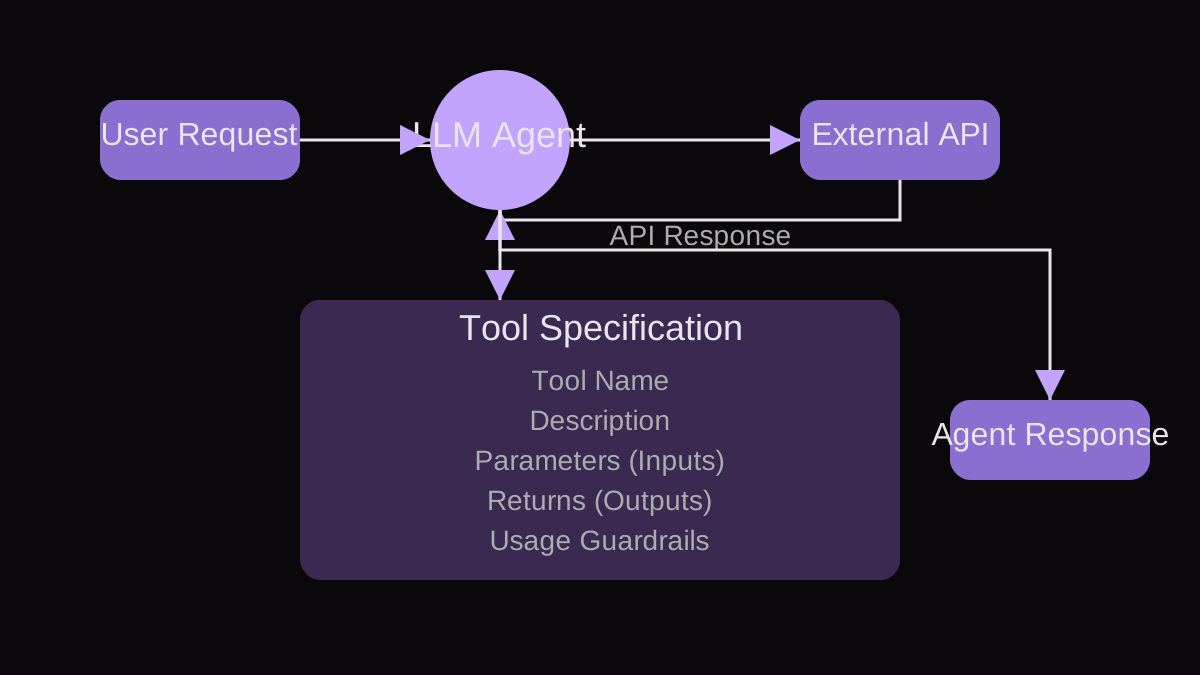
Once you've prioritized a tool, the next step is to design its specification. This is where the rubber meets the road for PMs. The agent needs to understand not just what a tool does, but when to use it, what inputs it requires, and what outputs to expect. A clear, concise tool description is paramount for the LLM's reasoning capabilities.
Let's consider a scenario: building an internal support agent for an IT department. One high-priority capability is to allow users to 'check the status of an ongoing IT ticket'. Currently, users have to log into a separate system or call the help desk. This is a clear capability gap for our agent.
Step 1: Define the Tool's Purpose and Name. The purpose is to retrieve the current status of an IT support ticket. We'll call it 'get_ticket_status'.
Step 2: Specify Inputs. What information does the tool need to function? To check a ticket status, it needs a 'ticket_id'. The PM must specify the format and type (e.g., 'string', 'numeric', 'alphanumeric code'). We also need to consider optional inputs, like a 'user_id' for authentication, but for simplicity here, let's assume the agent handles user context.
Step 3: Define Outputs. What information does the tool return? It should return the 'status' (e.g., 'Open', 'In Progress', 'Resolved', 'Closed'), 'assigned_agent' (name), 'last_update' (timestamp), and 'summary' (brief description). Crucially, define error outputs (e.g., 'Ticket not found', 'Permission denied').
Step 4: Craft the Tool Description for the LLM. This is a natural language explanation that guides the LLM on when and how to use the tool. It should be clear, unambiguous, and include examples.
- Tool Name: get_ticket_status
- Description: This tool retrieves the current status and details of an IT support ticket given its unique identifier. Use this tool when the user asks about the status of an IT ticket, or needs to find information about an existing ticket.
- Parameters:
- - ticket_id (string, required): The unique identifier for the IT support ticket. Example: 'IT-12345'
- Returns:
- - status (string): The current status of the ticket (e.g., 'Open', 'In Progress', 'Resolved', 'Closed').
- - assigned_agent (string): The name of the IT agent currently assigned to the ticket.
- - last_update (string): A timestamp indicating the last time the ticket was updated.
- - summary (string): A brief description of the ticket's issue.
- - error (string, optional): A description of the error if the tool call fails (e.g., 'Ticket not found', 'Invalid ticket ID').
Step 5: Define Usage Guardrails. When should the agent NOT use this tool? For example, if the user is asking to create a new ticket, this tool is inappropriate. The description helps the LLM with this, but explicit negative examples or constraints in the prompt can further refine behavior. Also, specify how the agent should handle missing 'ticket_id' – by asking the user for it, rather than hallucinating.
The 'why' behind this detailed specification is to minimize ambiguity for the LLM. A vague description leads to unreliable tool calls, incorrect parameters, or missed opportunities to use the tool. When it breaks, it's often due to insufficient detail in the description, leading the LLM to misuse the tool or fail to parse its output correctly.
Common Mistakes in Designing Agent Tool Use and How to Avoid Them
Even with careful planning, pitfalls abound when integrating tools with LLM agents. Recognizing these common mistakes can save significant development time and improve agent reliability.
- 1. Over-reliance on LLM for Tool Orchestration: Failure Mode: Expecting the LLM to flawlessly chain multiple complex tools or handle intricate conditional logic without explicit guidance. The LLM is a reasoning engine, not a robust workflow orchestrator. How to Detect/Avoid: When a tool chain involves more than 2-3 steps or requires branching logic, consider building a small, deterministic 'metatool' or a pre-defined workflow outside the LLM. The LLM then calls this single metatool, which encapsulates the complexity. This makes the system more robust and easier to debug.
- 2. Vague Tool Descriptions: Failure Mode: Providing insufficient detail in the tool's natural language description, leading the LLM to misuse the tool, call it with incorrect parameters, or fail to understand its purpose. How to Detect/Avoid: Test the tool description by asking a human (who doesn't know the tool's underlying code) to predict when and how they would use it based solely on the description. If there's ambiguity, refine it. Include explicit examples and negative examples in the description, and specify data types and constraints for parameters.
- 3. Inadequate Error Handling: Failure Mode: Not defining how the agent should react to tool execution failures (e.g., API timeouts, invalid inputs, unauthorized access). This leads to cryptic error messages for users or agent loops. How to Detect/Avoid: For every tool, explicitly define expected error responses and specify the agent's fallback behavior. Should it retry? Ask the user for more information? Suggest an alternative tool? Escalate to a human? Ensure the tool's output schema includes an 'error' field and test error paths rigorously.
- 4. Ignoring Latency and Cost: Failure Mode: Integrating tools without considering their execution time or per-call costs. A slow tool can degrade user experience, and a frequently called expensive tool can quickly become cost-prohibitive. How to Detect/Avoid: Include latency and cost estimates in your ACM prioritization. For high-latency tools, consider asynchronous execution patterns or informing the user of a potential delay. For expensive tools, implement caching mechanisms or rate limiting, and optimize when the tool is called (e.g., only after explicit user confirmation).
- 5. Security and Access Control Oversight: Failure Mode: Giving the agent access to tools with broad permissions without proper authentication, authorization, or scope limitation. This creates significant security vulnerabilities. How to Detect/Avoid: Implement the principle of least privilege. Each tool should have the minimum necessary permissions. Use secure API keys, OAuth, or other robust authentication methods. Consider sandboxing tools or running them in isolated environments. Regularly audit tool access and usage patterns.
The 'why' behind avoiding these mistakes is simple: agent reliability, user trust, and sustainable operations. A broken or insecure agent quickly loses user adoption and becomes a liability rather than an asset. Proactive design and testing are your best defenses.
Key Takeaways for PMs Designing Agent Tool Use
- Tool use is fundamental for LLM agents to perform real-world actions and overcome inherent LLM limitations.
- Prioritize tools using a structured framework like the Agent Capability Matrix (ACM) to align with user needs and business goals.
- Develop detailed tool specifications for the LLM, including clear descriptions, precise inputs, expected outputs, and usage guardrails, to minimize ambiguity.
- Anticipate and design for error handling, ensuring the agent can gracefully recover or inform the user when a tool call fails.
- Be mindful of latency and cost implications of tool usage; optimize expensive or slow tools through caching or asynchronous patterns.
- Implement robust security measures, adhering to the principle of least privilege, to protect sensitive data and systems accessed by agents.
- Avoid over-relying on the LLM for complex orchestration; use external workflows or 'metatools' for intricate multi-step processes.