AI Product
Designing for Multimodal AI: A PM's Guide to Vision, Voice, Text
Designing for multimodal AI is fundamentally about creating a unified, intuitive user experience across vision, voice, and text, rather than simply stitching together disparate input methods. My experience in streaming, fintech, and healthcare has shown me that true success lies in anticipating user intent across modalities, managing complex data fusion, and ensuring seamless transitions that enhance, not complicate, interaction. This requires a product manager to deeply understand context, predict failure points, and prioritize graceful error recovery from day one.
The core challenge isn't just enabling different inputs, but orchestrating them so the AI understands and responds holistically, adapting to the user's preferred or most appropriate modality at any given moment. This guide will walk you through the strategic considerations and practical steps to build truly intelligent multimodal products that delight users and drive adoption.
Why Does Multimodal AI Matter for Your Product?
Multimodal AI isn't just a buzzword; it's a critical evolution in how users interact with technology. Traditional interfaces often force users into a single interaction paradigm, be it typing, tapping, or speaking. Multimodal AI breaks these constraints by allowing users to engage with your product using the most natural and efficient method for their current context. Imagine a user driving a car, unable to type but able to speak. Or a user in a noisy environment, unable to speak but able to type or point. The 'why' is simple: it meets users where they are, reduces friction, and opens up new use cases that were previously impossible or highly inconvenient.
From a product perspective, multimodal capabilities can significantly enhance accessibility, improve engagement, and differentiate your offering in a crowded market. It allows for richer data input, leading to more nuanced AI understanding and more personalized responses. When done well, it feels magical; when done poorly, it's frustrating. The key is understanding that each modality brings its own strengths and weaknesses, and the product manager's role is to leverage these synergistically to create a superior overall experience.
The Multimodal Interaction Design (MID) Rubric: A Decision Framework
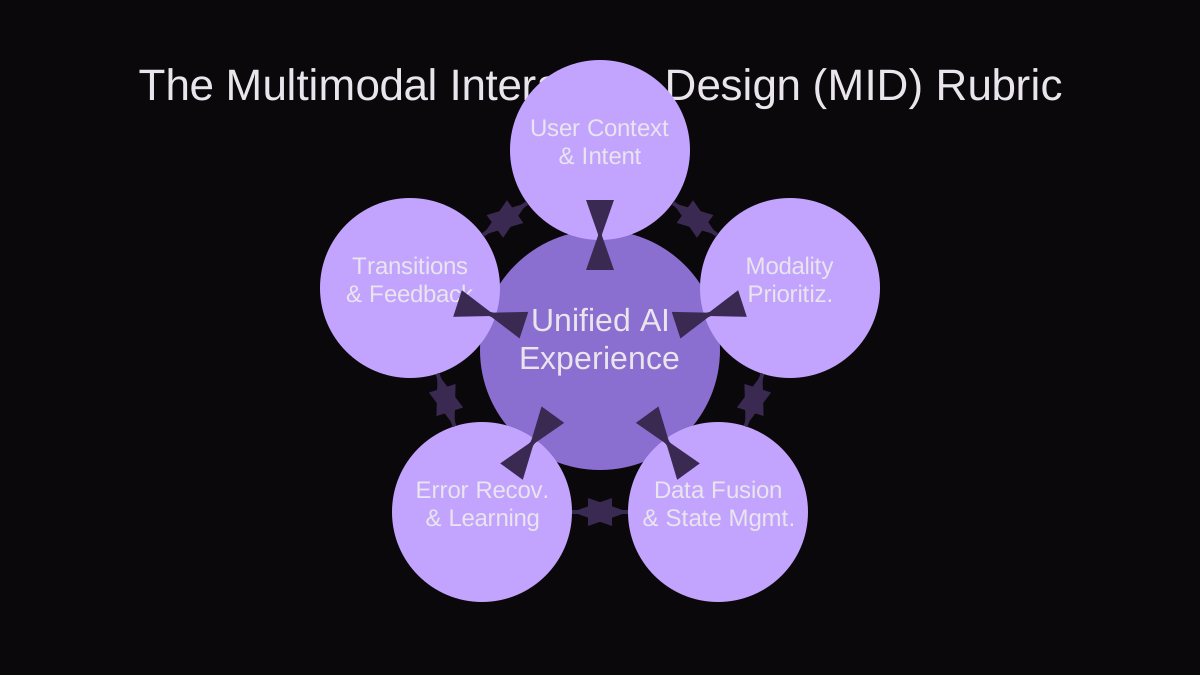
To systematically approach multimodal design, I've developed the Multimodal Interaction Design (MID) Rubric. This framework helps you evaluate potential interactions and ensure you're building a cohesive and user-centric system. Apply this rubric at the ideation and design phases to proactively identify challenges and opportunities.
- 1. User Context and Intent: What is the user trying to achieve, and in what environment? Is their hands-free, eyes-free, or full attention available? What are their cognitive load limitations? Prioritize understanding the fundamental need before choosing modalities.
- 2. Modality Appropriateness and Prioritization: Which modality or combination of modalities is most efficient, natural, and comfortable for the specific task and context? Is voice best for quick commands, text for complex queries, and vision for identification? Determine a primary modality and suitable fallback or supplementary modalities.
- 3. Data Fusion and State Management: How will information from different modalities be combined and interpreted by the AI? How will the system maintain a consistent understanding of the user's state and history across these inputs? This is where the AI's intelligence truly shines or falters.
- 4. Seamless Transitions and Feedback: Can users switch between modalities fluidly without losing context or progress? How will the system provide clear, timely feedback that acknowledges input from multiple sources and guides the user through the interaction? Avoid jarring shifts or silent failures.
- 5. Error Recovery and Learning Loops: What happens when an input is ambiguous, incomplete, or incorrect across modalities? How does the system gracefully recover, prompt for clarification, and learn from these interactions to improve future performance? A robust error strategy is crucial for user trust.
Worked Example: Medication Management AI Assistant
Let's apply the MID Rubric to a realistic scenario: an AI assistant for medication management, particularly for an elderly user or someone with impaired vision. The goal is to help them identify pills, manage dosages, and record adherence.
- 1. User Context and Intent: An elderly user, potentially with tremors or poor eyesight, needs to identify a pill they just dropped or confirm their next dosage. They might be in a poorly lit room or have their hands full. Their intent is to safely and accurately manage their medication.
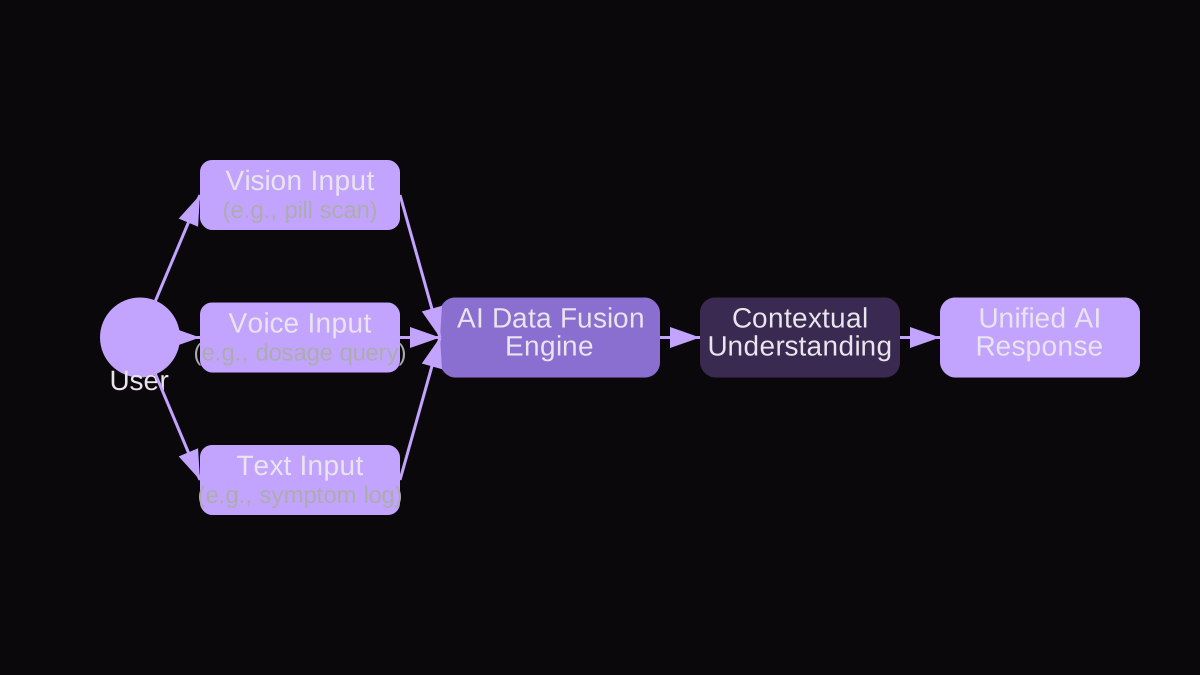
- 2. Modality Appropriateness and Prioritization: For identifying a dropped pill, vision is primary. The user can hold the pill up to the device's camera. For confirming dosage, voice is excellent for hands-free queries ('What's my next medication?'). Text might be used for reviewing a detailed medication schedule or setting complex reminders.
- 3. Data Fusion and State Management: When the user holds up a pill, the vision model identifies it (e.g., 'blue, oval, scored, with 'XYZ' imprint'). This visual data is fused with the user's medical profile (from text input during setup) to confirm if it matches a prescribed medication. If the user then asks via voice, 'What's the dosage for this?', the AI links 'this' to the previously identified pill, leveraging the visual context and the user's current state. The system maintains a state that includes identified pills, current time, and scheduled dosages.
- 4. Seamless Transitions and Feedback: The user holds up a pill (vision input). The AI responds via voice, 'I see a blue, oval pill with 'XYZ' imprint. Is this your Amlodipine?' (voice output, confirming visual input). The user says 'Yes' (voice input). The AI responds, 'Your next dose of Amlodipine is 5mg at 8 PM tonight.' (voice output, providing information based on fused visual and voice input). If the user then types 'Show side effects for Amlodipine', the system transitions to text display, maintaining context. Visual cues (e.g., a green outline around the identified pill on screen) and auditory feedback (e.g., a chime) confirm successful processing.
- 5. Error Recovery and Learning Loops: What if the pill isn't recognized? The AI asks, 'I'm having trouble identifying this pill. Could you please describe it, or try again in better light?' (voice output). If the user says 'Amlodipine' but holds up the wrong pill, the AI might say, 'I'm showing this pill as different from Amlodipine. Can you confirm the imprint or shape?' This allows for multimodal clarification. The system logs these ambiguities to improve its vision and voice models over time, learning from user corrections.
Common Mistakes in Multimodal AI Design (and How to Avoid Them)
Even with the best intentions, multimodal AI products can falter. Here are some frequent pitfalls I've observed and strategies to steer clear of them.
- Failure Mode: Over-Reliance on a Single Modality When Others are Better. Product teams often lean heavily on one modality (e.g., voice) because it's new or seems 'cooler,' even when text or vision would be more efficient for a specific task. For example, forcing a user to dictate a complex password rather than allowing them to type it or use a facial recognition scan.
- How to Detect/Avoid: Use the 'Modality Appropriateness and Prioritization' criterion from the MID Rubric. Conduct user research and scenario mapping. Ask: 'What's the most frictionless way to complete this specific sub-task, given common user contexts?' Prioritize efficiency and comfort over novelty.
- Failure Mode: Poor Contextual Hand-off Between Modalities. The AI treats each input as a fresh start, losing the thread of the conversation or interaction when the user switches modalities. For instance, asking a voice assistant 'Show me that again' after just having used a visual search, and the assistant responds with 'Show what again?'
- How to Detect/Avoid: Implement robust 'Data Fusion and State Management.' Ensure your AI's underlying state machine is modality-agnostic and maintains a persistent, evolving understanding of the user's intent and recent interactions. Test user journeys where modality switching is frequent and natural.
- Failure Mode: Lack of Clear Feedback on Modality Changes or Ambiguity. Users are left guessing if their input was understood, especially when they switch modalities or the AI struggles. A user provides a visual input, then a voice input, but the system only acknowledges one, or worse, both silently fail.
- How to Detect/Avoid: Focus on 'Seamless Transitions and Feedback.' Provide explicit, immediate feedback across all relevant modalities. If a voice command clarifies a visual input, the response should acknowledge both ('Got it, you mean the blue pill you just showed me'). If ambiguity arises, prompt for clarification using the most appropriate modality, often voice or text.
- Failure Mode: Neglecting Accessibility in Multimodal Design. Assuming that because you have multiple modalities, your product is inherently accessible. This often overlooks specific needs, such as a user who cannot speak AND has impaired vision, or someone with motor difficulties who struggles with precise touch targets for visual input.
- How to Detect/Avoid: Integrate accessibility experts into your design process from the outset. Design with WCAG principles in mind for each modality and their interactions. Consider fallback mechanisms for combinations of impairments. For example, if a user cannot see or speak, can they still interact effectively via haptics or alternative input devices?
- Failure Mode: Building a Frankensystem, Not a Unified AI. Developing vision, voice, and text components in silos and then trying to integrate them post-hoc. This results in an experience that feels disconnected, where each part works but they don't work together.
- How to Detect/Avoid: Embrace a 'Unified AI Experience' from the start. Your architecture and product roadmap should reflect a holistic integration strategy. The AI's core should be designed to receive and interpret inputs from any modality simultaneously, rather than passing data between separate, modality-specific modules. Treat multimodal as a core capability, not an add-on.
Key Takeaways for AI Product Managers
- Multimodal AI is about enhancing user experience and solving real-world problems by providing flexible, context-aware interaction options.
- Use a structured framework like the Multimodal Interaction Design (MID) Rubric to guide your design and evaluation process from ideation through implementation.
- Prioritize understanding user context and intent above all else; this drives appropriate modality selection.
- Invest heavily in robust data fusion and state management to ensure your AI maintains a consistent, unified understanding of the user's interaction history.
- Design for seamless transitions between modalities, providing clear feedback that acknowledges all user inputs.
- Anticipate and plan for graceful error recovery; how your AI handles ambiguity and mistakes is critical for user trust and retention.
- Avoid common pitfalls by proactively addressing issues like over-reliance on a single modality, poor context hand-off, and neglected accessibility.
- Think of multimodal as a foundational capability, not an afterthought. Build your AI to be inherently multimodal from its core.