Agents
Designing AI Agent UIs: A PM's UX Playbook
Designing user interfaces for AI agents is fundamentally different from designing for traditional software. It requires product managers to rethink established UX paradigms, moving from deterministic command-and-control interactions to designing for autonomy, dynamic decision-making, and emergent behavior. The core challenge is enabling users to understand, trust, and effectively guide an entity that acts on their behalf, often without explicit instruction for every step. This playbook outlines how to approach these unique challenges, ensuring your AI agents are not just intelligent, but also intuitively usable and genuinely helpful.
As AI agents become more sophisticated and take on greater responsibility, the interface becomes the crucial bridge between human intent and machine action. Product managers must prioritize transparency, control, and explainability to build user confidence and manage expectations. This isn't just about making things look good; it's about engineering trust and predictability in an inherently unpredictable system.
Why are AI Agent UIs Different? Understanding the Paradigm Shift
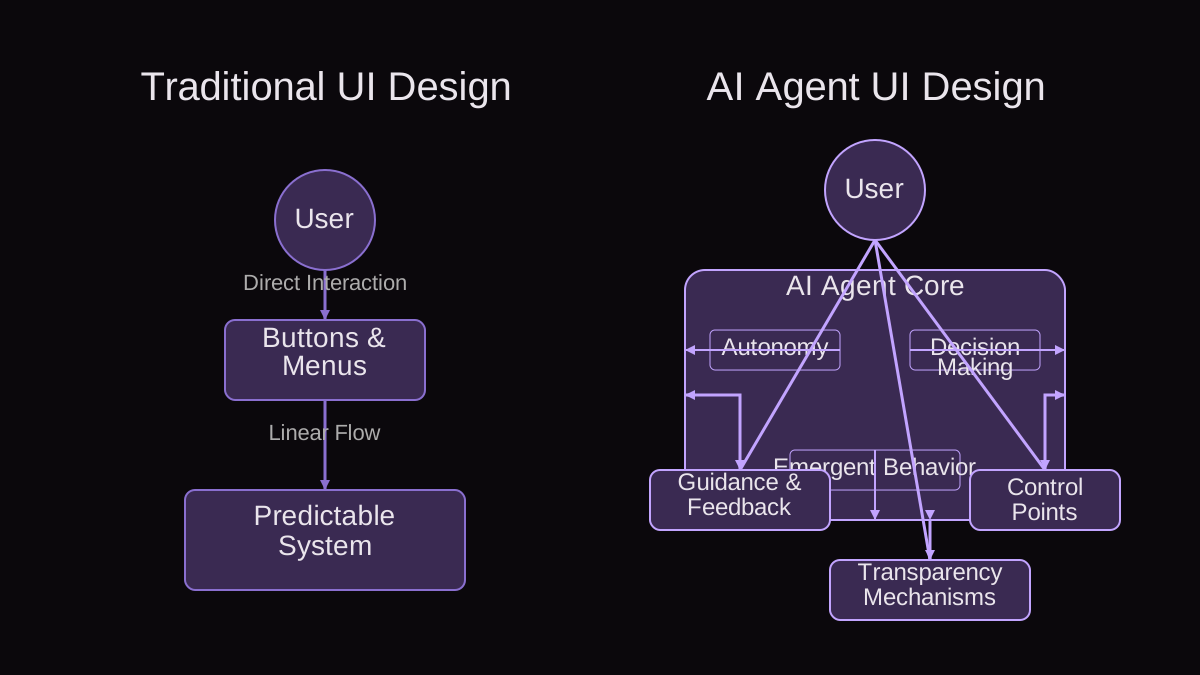
The fundamental distinction lies in agency. A traditional application waits for user input; an AI agent anticipates, acts, and learns. This shift introduces several unique UX challenges. First, non-determinism means the agent's actions may not always be perfectly predictable, requiring UIs that can communicate uncertainty and progress. Second, continuous interaction replaces discrete tasks, necessitating persistent feedback and intervention points. Third, the agent’s capacity for learning and adaptation means the interface needs to evolve alongside the agent, providing pathways for users to teach and correct. Without these considerations, an agent can feel like a black box, leading to frustration and disuse.
- Autonomy: Agents act proactively, not just reactively. The UI must support monitoring and intervention, not just command input.
- Non-Determinism: Agent behavior can be emergent and unpredictable. UIs need to explain actions and provide context for decisions.
- Continuous Interaction: Agents operate over time, requiring ongoing feedback loops and status updates rather than single-session task completion.
- Learnability: Agents adapt and improve. The UI must facilitate user teaching, preference setting, and correction of agent behavior.
- Explainability: Users need to understand why an agent took a certain action, especially when outcomes are critical or unexpected.
How Do We Design for Agentic Autonomy? The "Agent Trust Rubric"
To navigate the complexities of agentic UIs, I've found it invaluable to apply a structured approach. The Agent Trust Rubric provides a framework for evaluating and designing interfaces that foster user confidence and effective collaboration with AI agents. Apply this rubric at every stage of your design process, from ideation to iteration, to ensure you're building a foundation of trust.
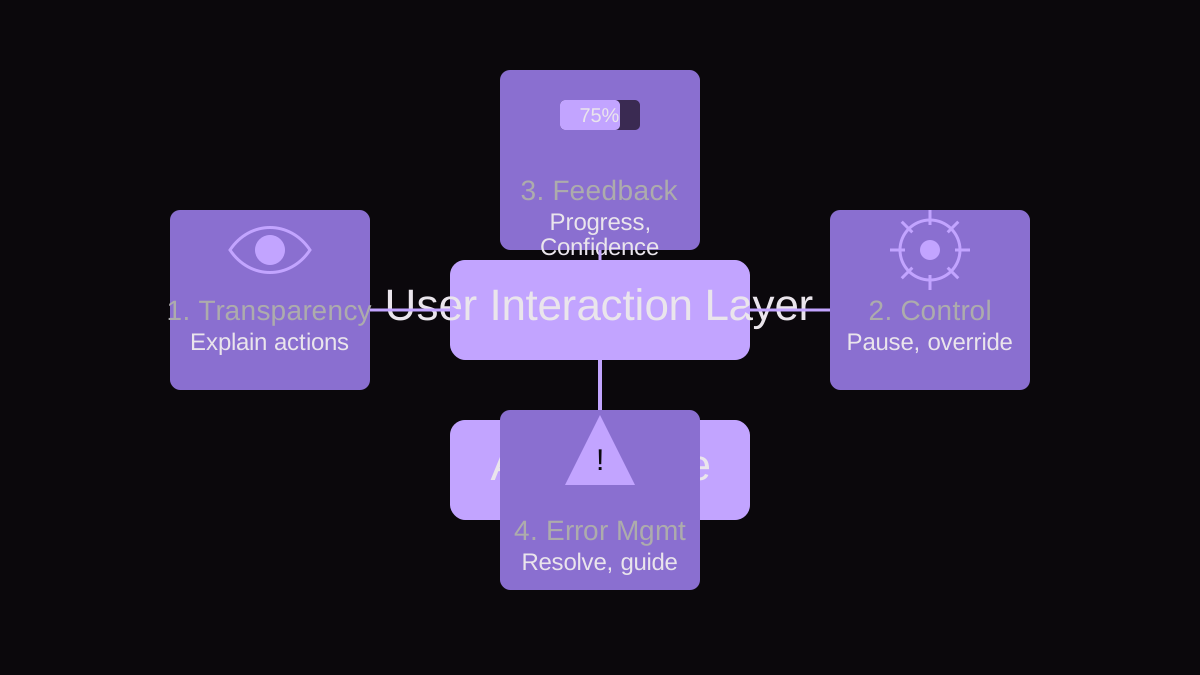
- 1. Transparency: Does the UI clearly show what the agent is doing, why it's doing it, and what its current state or intent is? Users should never feel like the agent is acting in a black box. This includes displaying confidence levels or alternative options.
- 2. Control: Does the user have appropriate levels of control, including the ability to pause, stop, modify, or override agent actions? This isn't about micro-managing, but about providing guardrails and recourse when necessary. Consider 'undo' functionality for critical actions.
- 3. Explainability: Can the agent articulate the reasoning behind its decisions in an understandable way? This is crucial for building mental models and helping users learn to trust the agent's judgment. Explanations should be concise and on-demand.
- 4. Reliability: Does the agent consistently perform its tasks as expected, within defined parameters? While not strictly a UI element, the UI must communicate this reliability (or lack thereof) honestly, showing success rates or known limitations.
- 5. Recoverability: When the agent encounters an error or an unexpected situation, does the UI provide clear pathways for recovery or user intervention? This includes suggesting solutions, asking for clarification, or handing off to human oversight gracefully.
By consistently evaluating your agent's UI against these five criteria, you ensure you're not just building a smart system, but a trustworthy partner. Each point reinforces the user's sense of agency and understanding, which are paramount in an autonomous environment. When any of these criteria are weak, user trust erodes quickly, leading to abandonment or misuse.
What Does an Agent UI Actually Look Like? A Worked Example
Let's walk through a concrete scenario: an AI Health Navigator agent designed to manage your routine medical appointments and prescription refills. This agent needs to proactively schedule check-ups, remind you of upcoming appointments, and ensure prescription renewals are handled before you run out. We'll apply the Agent Trust Rubric to its UI design.
Scenario: Scheduling an Annual Physical
- Step 1: Proactive Suggestion (Transparency, Explainability). The agent detects it's time for an annual physical based on your health profile and last appointment date. The UI displays: "It looks like you're due for your annual physical. I've found three available slots with Dr. Smith next month: [Date A, Time A], [Date B, Time B], [Date C, Time C]. Would you like me to book one of these, or should I look for other options?" A small info icon next to "annual physical" could explain the recommendation's basis (e.g., "Based on your age and last physical on MM/DD/YYYY").
- Step 2: User Choice & Confirmation (Control). The user selects "Date B, Time B." The UI immediately shows: "Confirming your annual physical with Dr. Smith on Date B at Time B. I will send a calendar invite and a reminder 24 hours prior. Is this correct?" The user has a clear 'Yes, book it' and 'No, change it' option. If the user chooses 'No, change it', the agent asks for preferences (e.g., "What days/times work better?").
- Step 3: Post-Booking Status (Transparency, Reliability). After booking, the UI updates with: "Annual Physical booked! See details below. I've added it to your calendar and will send a reminder. If anything changes, I'll notify you immediately." A dedicated section on the dashboard displays 'Upcoming Appointments' with the ability to 'Reschedule' or 'Cancel' (Control).
- Step 4: Handling Conflicts/Errors (Recoverability, Explainability). Imagine another appointment is already scheduled for Date B, Time B. The agent's UI should not just fail, but communicate: "I encountered a conflict with your existing dental appointment on Date B, Time B. Dr. Smith's office also has availability on [Date D, Time D]. Would you like me to book that instead, or should I try to reschedule your dental appointment?" This provides context and offers clear recovery paths, putting the user in charge of the resolution.
- Step 5: Ongoing Monitoring (Transparency, Learnability). Over time, the agent learns user preferences (e.g., always prefers morning appointments, avoids Mondays). The UI could show a small 'Agent Learning' indicator or a 'Preferences' section where users can explicitly set and review these learned behaviors, reinforcing trust and allowing for correction.
How Can We Handle Errors and Unexpected Behavior Gracefully?
Errors are inevitable, especially with autonomous agents. How your UI handles them can make or break user trust. Graceful error handling isn't just about displaying an error message; it's about providing context, explaining the failure, and offering actionable solutions for recovery or intervention. An agent that simply says "I couldn't complete that" is useless; one that says "I tried to book your flight but the airline's API returned an error; I can try again, or you can check their website directly" is helpful.
- Proactive Error Communication: Don't wait for the user to discover an error. If the agent anticipates a problem (e.g., a service is down, a dependency is missing), communicate it upfront. "Heads up: The pharmacy's system is currently offline, so I can't request your refill right now. I'll try again in an hour."
- Contextual Explanations: When an error occurs, provide enough detail for the user to understand what went wrong without overwhelming them. Avoid jargon. "I couldn't access your calendar to book the meeting because the authorization token expired. Please re-authenticate your Google Calendar."
- Clear Recovery Paths: Offer specific steps the user can take to resolve the issue or guide the agent. This might involve retrying, modifying input, or escalating to human support. "The requested document is not available. Would you like me to search other sources, or should I notify you when it's uploaded?"
- "Undo" Functionality: For critical or irreversible actions, provide an 'undo' or 'revert' option, even if it's only available for a short window. This provides a safety net and boosts user confidence in experimenting with agent capabilities.
- Hand-off to Human: For complex or sensitive issues the agent cannot resolve, the UI should offer a clear path to human intervention, whether it's customer support, a domain expert, or a detailed report for review. "I'm unable to resolve this complex billing discrepancy. I've created a summary of the issue; would you like me to send it to customer support?"
Common Mistakes in Designing Agent UIs (and How to Avoid Them)
As product managers, we often fall into familiar traps when venturing into new design territory. Agent UIs are no exception. Recognizing these common pitfalls is the first step to avoiding them.
- Mistake: Over-automation without sufficient control. Failure Mode: Users feel helpless or out of sync with the agent, leading to frustration and disengagement. The agent acts too much on its own, without validation points. Detection/Avoidance: Implement the 'Control' aspect of the Agent Trust Rubric rigorously. Provide clear pause, stop, and override options. Conduct user testing to identify where users feel a lack of agency or desire more input.
- Mistake: Opaque decision-making. Failure Mode: The agent becomes a 'black box,' and users don't understand why certain actions were taken, leading to distrust. Detection/Avoidance: Prioritize 'Transparency' and 'Explainability.' Integrate 'why' explanations into the UI, making them easily accessible (e.g., via info icons, expandable sections). Log agent decisions and make them viewable in an activity feed.
- Mistake: Poor or infrequent feedback loops. Failure Mode: Users are left guessing about the agent's progress, state, or success, leading to anxiety and uncertainty. Detection/Avoidance: Design for continuous feedback. Use progress indicators, status messages, and notifications. Confirm actions taken and communicate outcomes clearly, even for background tasks. Apply the 'Reliability' and 'Transparency' rubric points.
- Mistake: Ignoring user mental models. Failure Mode: The agent's behavior or interaction patterns don't align with how users naturally think about the task, leading to confusion and errors. Detection/Avoidance: Conduct extensive user research early and continuously. Understand existing workflows and expectations. Design the agent to augment, not completely reinvent, established user behaviors where possible. Think about analogies to human assistants.
- Mistake: Underestimating the complexity of error states. Failure Mode: The UI handles only happy paths, and when errors occur, it provides cryptic messages or no guidance, leaving users stranded. Detection/Avoidance: Dedicated design sprints for error handling and edge cases. Map out all possible failure points and design specific recovery paths for each. Apply the 'Recoverability' rubric criteria and test these scenarios rigorously in QA and user testing.
- Mistake: Focusing solely on task completion metrics. Failure Mode: While task completion is important, it doesn't capture user sentiment, trust, or the quality of the agent's interaction. An agent might complete tasks, but users might hate using it. Detection/Avoidance: Complement quantitative metrics with qualitative feedback. Use surveys (e.g., System Usability Scale, Net Promoter Score), interviews, and sentiment analysis to understand the user experience beyond simple task success. Measure user effort and satisfaction with agent interactions.
What Metrics Matter for Agent UI Success?
Measuring the success of an agent UI goes beyond traditional UX metrics. While task completion rates and time-on-task remain relevant, you need to consider metrics that reflect the unique aspects of agentic systems. User satisfaction with the agent's autonomy and decision-making is paramount. Look at agent intervention rates – how often does the user need to correct or override the agent? Lower intervention rates often indicate higher trust and better alignment with user intent. Conversely, a high rate could signal a need for more control points or better explainability.
Also, track 'Agent adoption rate' and 'Retention of agent usage.' If users try the agent but don't stick with it, your UI likely isn't fostering trust or providing sufficient value over time. Qualitative feedback through surveys, usability testing, and sentiment analysis of user interactions with the agent are crucial for understanding the 'why' behind the quantitative data.
Key Takeaways
- AI agent UIs demand a new UX mindset focused on autonomy, non-determinism, and continuous interaction.
- Prioritize Transparency, Control, and Explainability to build user trust and effective human-agent collaboration.
- Utilize the Agent Trust Rubric (Transparency, Control, Explainability, Reliability, Recoverability) as a guiding framework throughout your design process.
- Design for proactive, contextual error handling with clear recovery paths and 'undo' functionality.
- Avoid common pitfalls like over-automation, opaque decision-making, and poor feedback by rigorously applying trust principles.
- Measure success not just by task completion, but by user satisfaction, intervention rates, and long-term agent adoption and retention.
- Remember that the UI is the agent's voice; it dictates how users perceive and interact with its intelligence.